
If you’re setting up a workshop or planning to scale production, you’ll almost certainly face this question:
Should you invest in a CNC router or a laser cutter?
It’s a common dilemma. Many small business owners end up choosing the wrong machine, not because they didn’t research enough, but because they focused on what a machine can do, instead of what it does best for their actual workflow.
There’s no universally “better” option here. The right choice depends on your materials, your products, and ultimately, how you make money.
Let’s break it down in a practical way.
1. The Core Difference: How They Actually Cut
Understanding the cutting method clears up most of the confusion.
A CNC router uses a rotating cutting tool to physically remove material.
It works like a highly precise, automated version of a handheld router. Because it’s mechanical, it allows for true depth control. You can cut, drill, pocket, and create 3D shapes.
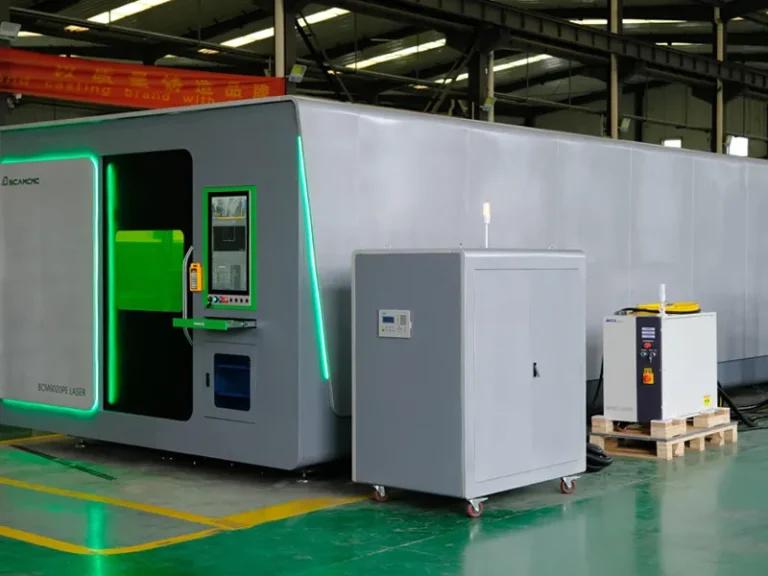
A laser cutter (typically a CO₂ laser in this comparison) uses a focused beam of energy to burn or vaporize material.
It’s extremely fast for cutting and engraving thin materials, and it often leaves a clean, finished edge. However, it is primarily a 2D cutting tool. It cuts through material or marks the surface, rather than shaping depth in the same way a router does.
2. Material Compatibility: Where the Decision Usually Gets Made
In most real-world cases, your materials will decide for you.
Wood
Both machines can process wood, but not in the same way.
- For furniture, cabinetry, and thick panels (MDF, plywood, solid wood), a CNC router is the more practical choice. It handles thickness and structural cuts reliably.
- A laser can cut thin wood, but edges are often slightly charred and may require finishing.
MDF & Melamine
These are standard materials in furniture production.
- CNC routers are designed for this kind of work: cutting, drilling, grooving, and nesting panels.
- Lasers are not efficient for thick MDF and are rarely used in production environments for this purpose.
Acrylic
This is where lasers stand out.
- Laser cutters produce smooth, polished edges directly after cutting.
- CNC routers can cut acrylic, but usually require polishing or additional finishing to achieve the same clarity.
Metals
- CNC routers can process non-ferrous metals like aluminum or brass with proper tooling and setup.
- Most CO₂ laser machines in typical workshop budgets can only mark metal, not cut it.
3. Cost Is More Than the Machine Price
Looking only at the purchase price is a fast way to underestimate your actual investment.
CNC Router Considerations
- Cutting tools wear out and need replacement
- Requires dust collection (especially for wood and MDF)
- Generates noise and debris
- Needs proper feed/speed setup to maintain quality
Laser Cutter Considerations
- Requires a reliable ventilation system (smoke and fumes are unavoidable)
- Laser tubes (for CO₂ systems) have a limited lifespan, typically around 1,000–3,000 hours
- Optics and alignment need regular maintenance
Neither machine is “low maintenance.” They just demand attention in different areas.
4. Workflow Matters More Than Machine Specs
Instead of comparing features, it’s more useful to look at your actual products.
Choose a CNC Router if:
- You produce furniture, cabinets, or structural components
- Your materials are thick panels or solid materials
- You need cutting, drilling, and carving in one process
- Your work involves joinery or 3D shaping
Typical examples:
- Kitchen cabinets
- Custom furniture
- Signage with depth
- Guitar bodies or wooden components
Choose a Laser Cutter if:
- You focus on thin materials and detailed designs
- Your products depend on clean edges and fine detail
- Speed in 2D cutting is critical
- You do engraving or personalization work
Typical examples:
- Acrylic signage
- Decorative panels
- Jewelry or crafts
- Engraved products
5. A Simple Way to Decide (That Actually Works)
Instead of thinking about machines, look at your recent or planned jobs.
Ask yourself:
- Are my materials mostly thick or thin?
- Do I need depth and structure, or just precision outlines?
- How much post-processing am I willing to do?
- Am I selling function or visual detail?
Patterns show up quickly when you look at real work instead of specifications.
Final Thoughts
A CNC router is a workhorse.
A laser cutter is a precision tool.
If your business is built around structural, load-bearing, or three-dimensional products, a CNC router is the more reliable choice.
If your value comes from speed, fine detail, and clean finishes on thin materials, a laser cutter will likely fit better.
If you’re still unsure, don’t overthink it. Look at your best-selling products or the type of work you want to attract.
They already tell you which machine you need.