
In the case of using woodworking cnc router machine, people must know the operation steps clearly. If they do not understand the operation steps or do not follow the actual operation steps, it will not only endanger people’s work progress, but may even cause accidents. Appear. The following are some simple and detailed introductions for everyone on how to actually operate the carpenter woodworking cnc router machine.
1, start
In the case of start-up, the first thing people need to do is to clarify whether the CNC lathe of the woodworking cnc router machine has been connected to the electronic computer normally, and then turn on the computer’s switching power supply and the woodworking cnc router machine’s switching power supply, and everything about the system software After the normal start, enter the CNC machine tool.
2. Mechanical equipment calibration
Before announcing the work attitude, the first system software will distinguish whether the CNC lathe has a wood or return to the starting point of the mechanical equipment. Therefore, after starting, people will first see a reminder box, click on the matching button, the CNC of the woodworking cnc router machine The lathe will automatically repair to the starting point.
3, I/O situation
It is necessary to check the input of the data signal and its output status, and see if there is any abnormal data signal. If not, you can do it again.
4, the production and processing program flow of loading
Before the woodworking cnc router machine announces its working attitude, the operator must first load the production and processing procedures. If there is no proper loading of the production and processing procedures, the equipment will not be able to perform fully automatic production and processing.
Click “Document F”-“Open and load O”, and then an actual operation prompt box will pop up, in which people select the documents that must be produced and processed. Or you can right-click the computer mouse in the dialog box of fully automatic production and processing, and there will be a shortcut menu pop-up window, select “open and load” in the prompt box, people select the documents that must be produced and processed. After you have selected it, click the button to open, and the process of production and processing can be loaded into the system software normally. In this case, click on “Automatic” to query the process of production and processing that you have selected today.
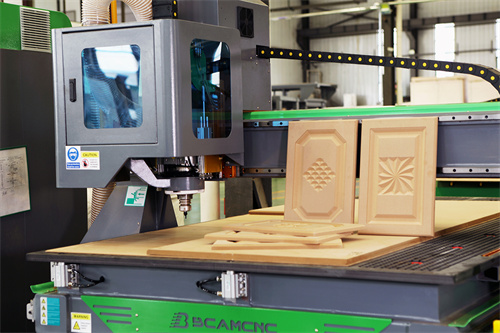
The woodworking cnc router machine is mainly used in the carpenter manufacturing industry, and it is mainly used in the production and processing of windows and doors, and the production and processing of artworks. This is all possible. Secondly, there are certain applications in the advertising slogan mold industry, such as clothes hang tags and plastic plates in advertising slogans. In other industries, such as large and medium-sized relief production, craft products manufacturing industries also have certain applications.
Close the detailed introduction of woodworking cnc router machine, I firmly believe that you have already mastered the operation of woodworking cnc router machine after reading the article content of the editor, if you have other questions, you can directly consult our online customer service.